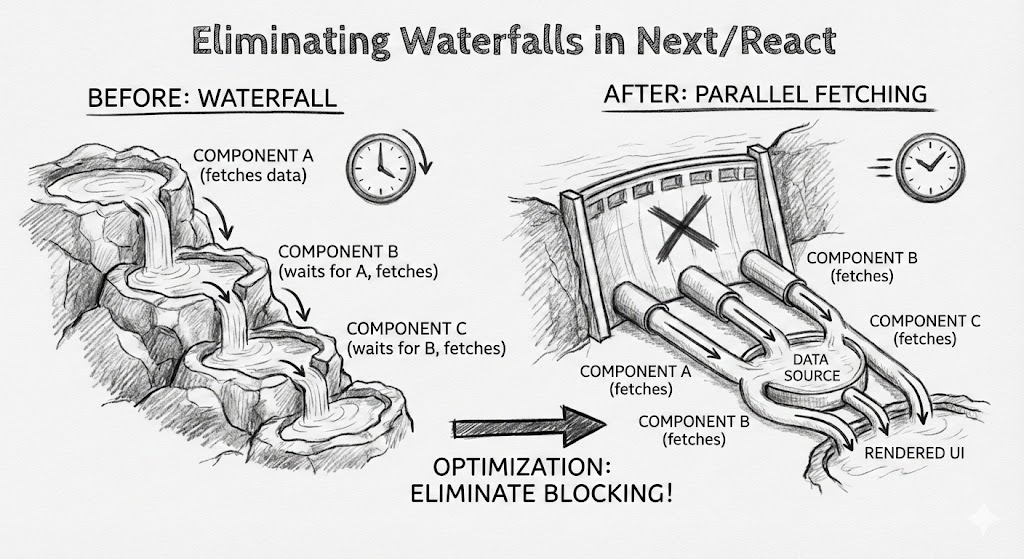
In this bogpost, I’ve discussed the first and most critical category from the skill: Eliminating Waterfalls. It’s one of the highest-leverage optimizations because sequential async work can silently add hundreds of milliseconds to your page load and API response times.
1. Eliminating Waterfalls
What are waterfalls?
A waterfall is when async work runs sequentially even though parts of it could run in parallel. They are a common and expensive performance problem in web apps. Vercel categorizes them as critical because they directly increase user-perceived latency.
Waterfalls in web requests (API / server routes)
(insert diagram showing a waterfall for requests)
In an API route or server action, a waterfall typically comes from sequential awaits:
jsconst session = await auth()
const config = await fetchConfig()
const data = await fetchData(session.user.id)
Even if fetchConfig() and auth() are independent, they run one after another.
Result: total time = auth + config + data
Ideally, the time taken should have been max(auth, config) + data.
Waterfalls in React Server Components (RSC)
In a similar fashion, when writing React, waterfalls block your UI because a parent component waits for data before returning JSX.
jsxexport default async function Page() {
const data = await fetchData() // blocks the whole page render
return (
<Layout>
<Sidebar />
<Header />
<Main data={data} />
<Footer />
</Layout>
)
}
Only <Main /> needs that data, but React can't render any of the layout until fetchData() completes.
Result: slower initial paint and delayed streaming.
Harm cause by waterfalls
Waterfalls add full network latency per step. A single extra sequential call is typically 100–500ms on real networks. With 2–3 stacked awaits, you add 1–2 seconds of delay. Common outcomes:
- Slower TTFB (server responds later)
- Slower LCP (main content appears late)
- Layout feels stuck while loading
- Worse performance on mobile and high-latency connections
- Server time wasted on sequential work To summarise, Waterfalls scale linearly with latency, which is why they're a major performance problem.
How to fix waterfalls
The principle is simple: start work early, await when you need the result.
1. Use await only when you need it, not before that.
Don't block the whole function if a branch might early-return. Fetch inside the branch that uses it.
For example,
jsimport { redirect } from "next/navigation"
export default async function Page() {
const data = await fetch("https://example.com/data").then(r => r.json())
const loggedIn = false
if (!loggedIn) redirect("/login")
return <pre>{JSON.stringify(data)}</pre>
}
In the above example, we are fetching data first and then checking if the user is logged in or not. Ideally, we should be doing the auth check first, and then fetch the data so that we can return the component as early as possible and our app feels snappy.
Correct code:
jsimport { redirect } from "next/navigation"
export default async function Page() {
const loggedIn = false
if (!loggedIn) redirect("/login")
const data = await fetch("https://example.com/data").then(r => r.json())
return <pre>{JSON.stringify(data)}</pre>
}
2. Parallelisation and Promise.all
Just call your data fetches in parallel rather than sequentially. There is a nice caveate here in react tho.
Case A: Independent operations Bad code:
jsconst user = await getUser() // 100ms
const posts = await getPosts() // 100ms
// Total time taken: 200ms
Good code:
jsconst [user, posts] = await Promise.all([getUser(), getPosts()]) // 100ms
// Total time taken: 100ms
Case B: Dependent operations Bad code:
jsconst user = await getUser() // 200ms
const config = await getConfig() // +300ms
const profile = await getProfile(user.id) // +400ms
// Total time taken: 900ms
Good code:
js// getUser: 200ms
// getConfig: 300ms
// getProfile:400ms
const userPromise = getUser() // starts at t=0ms, ends at t=200ms
const configPromise = getConfig() // starts at t=0ms, ends at t=300ms
const user = await userPromise // waits until t=200ms
const [config, profile] = await Promise.all([
configPromise, // remaining time: 100ms (t=200ms → t=300ms)
getProfile(user.id), // starts at t=200ms, ends at t=600ms
])
// Total time = 600ms
As you can see, we managed to save 300ms here.
3. Prevent waterfall chains in API routes
The same Parallelisation and Promise.all usage should be done in API routes and Server Actions, start independent operations immediately, even if you don't await them yet.
Incorrect: config waits for auth, data waits for both
typescript
export async function GET(request: Request) {
const session = await auth() //100ms
const config = await fetchConfig() //300ms+
const data = await fetchData(session.user.id) //400ms+
return Response.json({ data, config })
}
// Total time taken: 800ms
Correct: auth and config start immediately
typescriptexport async function GET(request: Request) {
// Example timings:
// auth() = 100ms
// fetchConfig = 300ms
// fetchData = 400ms (needs session.user.id)
const sessionPromise = auth() // starts at t=0ms, ends at t=100ms
const configPromise = fetchConfig() // starts at t=0ms, ends at t=300ms
const session = await sessionPromise // waits until t=100ms
const [config, data] = await Promise.all([
configPromise, // remaining time: 200ms (t=100ms → t=300ms)
fetchData(session.user.id), // starts at t=100ms, ends at t=500ms
])
return Response.json({ data, config })
}
// Total time taken: 500ms
As you might have expected, we saved 300ms.
Pro tip: For the more complex dependency based parallelisations, use a lib called better-all which automatically maximises prallelism.
4. await is JSX and adding Suspense
In React Server Components, awaiting data in the parent blocks the entire page. Even if only one section needs the data, your layout, header, and sidebar will still wait. The fix is to fetch inside the child and wrap it in a <Suspense /> boundary so the page shell renders immediately.
Incorrect: whole page waits for data
tsxexport default async function Page() {
const data = await fetchData()
return (
<Layout>
<Sidebar />
<Header />
<Main data={data} />
<Footer />
</Layout>
)
}
Correct: shell renders immediately, only Main suspends
tsximport { Suspense } from "react"
export default function Page() {
return (
<Layout>
<Sidebar />
<Header />
// Note: We added suspense here and show a skeleton until the data is fetched.
<Suspense fallback={<div>Loading...</div>}>
<Main />
</Suspense>
<Footer />
</Layout>
)
}
async function Main() {
const data = await fetchData()
return <div>{data.title}</div>
}